

Codebase Context Indexing
Workik AI connects directly to GitHub, GitLab, and Bitbucket repositories and indexes code, structure, and documentation using RAG.
AI Powered Development
Features
Advanced Features for Building Repo-Aware AI Agents


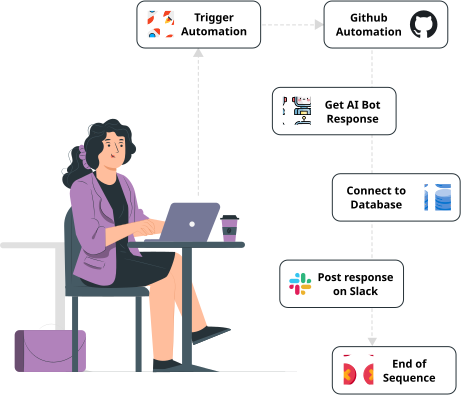

 Github
 Gitlab
 Bitbucket
 Azure DevOps
 SQL & NoSQL DB's
 Postman
 Slack
Slack
 Microsoft Teams
 Email
Email
 JiRA
JiRA
 Discord
Features
AI BACKEND CODE GENERATOR
AI Querying

Add any backend context relevant to you
Support All languages (Node.js, Java, Python, JavaScript, bash…)
.png)

TESTIMONIALS
Built for Teams That Care About Context
Real Stories, Real Impact with Workik AI

“We tried a few AI tools before this, but they kept missing context. With Workik AI, the answers actually line up with how our code is written. That’s what made us stick.”

Peyton Baker
Senior Engineer
“The biggest difference with Workik AI was trust. We could test responses against our repo before sharing it with the team, which made adoption much easier.”

Eric Schmidt
Engineering Manager
“We use Workik AI mostly to understand unfamiliar parts of the codebase. It’s been especially useful during onboarding and code reviews.”

Jacob Smith
CTO

Access Logs & Usage Reports
Track AI access and usage across repositories and agents.

Role-Based Access Control
Manage user roles, permissions, and agent access at workspace level.

Security & Compliance Controls
Built-in safeguards aligned with standard security practices.

Workik AI for Teams & Enterprise
Enable teams to create AI agents grounded in shared repositories and organizational standards.
FEATURES

Shared AI agents built on common repository context
Centralized control over agent access and usage
Consistent code understanding across teams
Slack and Discord access for shared AI agents
Workik AI for Developers
Create and test personalized AI agents to assist with code understanding, debugging, and development tasks.
FEATURES
Create repo-aware AI agents for your codebase
AI retrieves context from connected repositories
Supports frontend, backend, APIs, databases, and infrastructure
Use isolated workspaces for different repositories or tasks
Understand how Workik can fit in with your requirements?
Schedule a demo

Can I customize the AI behavior in Workik?


Yes. Workik AI allows you to configure AI agents with repository-specific context, defined roles, and controlled response behavior. Agents reason using connected repositories rather than generic prompts.
What kind of context can I add in Workik AI?
You can add repository code, folder structures, documentation files, configuration files, and related metadata. This context is used for Retrieval-Augmented Generation (RAG).
Do I need to connect a database to use Workik AI?
No. Connecting a database is optional. Workik AI primarily operates on repository-based context and can function without live database access.
Does Workik AI support different programming languages?
Yes. Workik AI supports repositories written in multiple programming languages and can reason across mixed-language codebases.
How do teams collaborate using Workik AI?
Teams can share repositories, configure common AI agents, control access permissions, and use the same agents across workspaces or communication tools.
What are AI tokens in Workik AI?
AI tokens represent usage units consumed when AI agents process repository context and generate responses. Token usage varies based on context size and response depth.
Does Workik AI train on my private code?
No. Your repositories are used only for retrieval during AI interactions and are not used to train models.
Can't find answer you are looking for?
Request question

Request question
Please fill in the form below to submit your question.
Try For Free

